
There are some production notes about mongodb version 3.2 before install. https://docs.mongodb.org/manual/administration/production-notes/ Installation on Ubuntu
sudo apt-key adv --keyserver hkp://keyserver.ubuntu.com:80 --recv EA312927

echo "deb http://repo.mongodb.org/apt/ubuntu trusty/mongodb-org/3.2 multiverse" | sudo tee /etc/apt/sources.list.d/mongodb-org-3.2.list

sudo apt-get update

For latest stable version:
sudo apt-get install -y mongodb-org

For specific release of MongoDB:
sudo apt-get install -y mongodb-org=3.2.0 mongodb-org-server=3.2.0 mongodb-org-shell=3.2.0 mongodb-org-mongos=3.2.0 mongodb-org-tools=3.2.0

Service:
sudo service mongod start/stop/restart

Mongo Command Line:
$ mongo
MongoDB shell version: 3.2.0
connecting to: test
>

Port of mongod service: 27017

Mongod Log Location:           /var/log/mongodb
Mongod Installation Location:  /var/lib/mongodb
After Ubuntu 16.04 there is no service to start MongoDB. We just need to edit some service configuration. Open a new text then edit as below.
sudo nano /etc/systemd/system/mongodb.service
[Unit]
Description=High-performance, schema-free document-oriented database
After=network.target

[Service]
User=mongodb
ExecStart=/usr/bin/mongod --quiet --config /etc/mongod.conf

[Install]
WantedBy=multi-user.target
sudo systemctl start mongodb
Sample Init Script For mongos Service
#!/bin/bash

### BEGIN INIT INFO
# Provides:        MongoDB Config Server
# Required-Start:  $network
# Required-Stop:   $network
# Default-Start:   2 3 4 5
# Default-Stop:    0 1 6
# Short-Description: Start/Stop MongoDB Config server
### END INIT INFO

start() {
        /usr/bin/mongos --configdb 192.168.3.187:27018 --port 27019 &
}

stop() {
        for a in `ps -ef | grep 27018 | awk '{print $2}'`; do kill -9 $a; done
}

case $1 in
  start|stop) $1;;
  restart) stop; start;;
  *) echo "Run as $0 <start|stop|restart>"; exit 1;;
esac
sudo update-rc.d mongos defaults
Problem of WARNING: /sys/kernel/mm/transparent_hugepage/enabled is 'always'
sudo nano /etc/init/mongod.conf

    // add after 'chown $DEAMONUSER /var/run/mongodb.pid'  //

    if test -f /sys/kernel/mm/transparent_hugepage/enabled; then
       echo never > /sys/kernel/mm/transparent_hugepage/enabled
    fi
    if test -f /sys/kernel/mm/transparent_hugepage/defrag; then
       echo never > /sys/kernel/mm/transparent_hugepage/defrag
    fi

    // and before 'end script' //

sudo service mongod restart
Adding some users (Role-based)
$ mongo

use admin

db.createUser(
    {
      user: "root",
      pwd: "abc1234",
      roles: [ "root" ]
    }
)

use mqtt

db.createUser(
    {
      user: "mqttUser",
      pwd: "abc1234",
      roles: [ { role: "readWrite", db: "mqtt" } ]
    }
)
Enable Role Based Authentication
security:
   authorization: enabled
Sample Connection of mongod Service
mongo --host 192.168.1.50 --port 27017 -u root -p abc1234 --authenticationDatabase admin
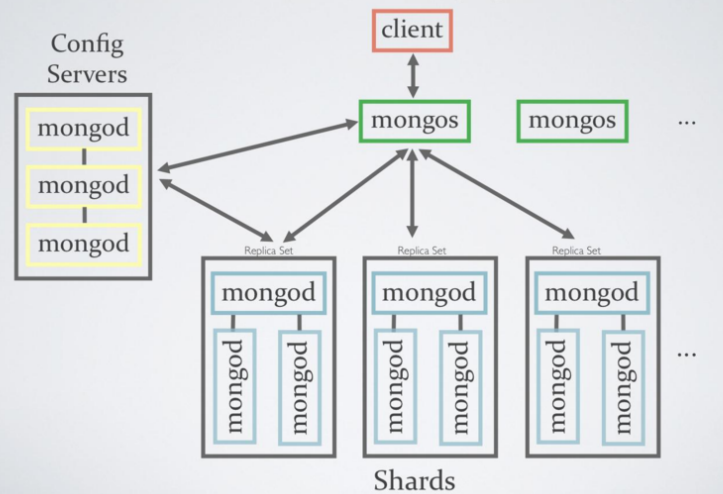
Diagram of mongo Services
 Enable Internal Authentication
openssl rand -base64 741 > mongodb-keyfile
sudo su
$ root
mkdir /srv/mongodb
openssl rand -base64 741 > /srv/mongodb/mongodb-keyfile
chmod 600 /srv/mongodb/mongodb-keyfile
chown mongodb:mongodb mongodb-keyfile
exit
$ username
Deploy a Replicated Config Servers
security:
  keyFile: /srv/mongodb/mongodb-keyfile

sharding:
   clusterRole: configsvr

replication:
   replSetName: configReplSet
Deloy a Replicated Shard Servers
security:
  keyFile: /srv/mongodb/mongodb-keyfile

sharding:
   clusterRole: shardsvr

replication:
   replSetName: shardReplSet
Initiate the Replica Sets
rs.initiate()
rs.conf({
  _id: <string>,
  version: <int>,
  protocolVersion: <number>,
  members: [
    {
      _id: <int>,
      host: <string>,
      arbiterOnly: <boolean>,
      buildIndexes: <boolean>,
      hidden: <boolean>,
      priority: <number>,
      tags: <document>,
      slaveDelay: <int>,
      votes: <number>
    },
    ...
  ],
  settings: {
    chainingAllowed : <boolean>,
    heartbeatIntervalMillis : <int>,
    heartbeatTimeoutSecs: <int>,
    electionTimeoutMillis : <int>,
    getLastErrorModes : <document>,
    getLastErrorDefaults : <document>
  }
})
rs.status()
For more details: https://docs.mongodb.org/manual/reference/replica-configuration/ Adding some members
rs.add("mongodb1.example.net")
rs.add("mongodb2.example.net")
Start to mongos Services
mongos --configdb configReplSetName/<cfgsvr1:port1>,<cfgsvr2:port2>,<cfgsvr3:port3>
Add Shards to the Cluster
$ mongo --host <hostname of machine running mongos> --port <port mongos listens on>
sh.addShard( "shardReplSet/mongodb0.example.net:27017" )
sh.enableSharding("<database>")
sh.shardCollection("<database>.<collection>", shard-key-pattern)
Example of shard-key pattern is
{ "zipcode": 1, "name": 1 }
sh.status()